

Software Networking
This article is dedicated to those crazy enough to wonder if you could, but didn’t stop to consider if you should. The short answer is yes! You can virtualize your entire home network and route at 5Gbps on modern hardware, even without hardware acceleration enabled. I can already hear everyone rolling their eyes questioning “but why?”. This is a short justification for how I fell down the rabbit hole of building a completely insane software networking solution. It works surprisingly well, even though the fear of it breaking keeps me up at night 😂.
The Hardware Gap
Recently my Internet Service Provider (ISP) convinced me to get a 5Gbps plan, which was even cheaper than my existing 1Gbps, how could I say no? Sounds great till I remembered I was still on 1Gbps hardware. In 2025, if you want faster than 1G, you essentially have 2 hardware options: 2.5Gbps, and 10Gbps. 2.5G gear is relatively affordable, but wouldn’t use the full bandwidth provided by my ISP. 10G gear was comically expensive, which was absurd given 10G has been around forever, especially in datacenters. It didn’t help that when I salvaged an old Dell PowerEdge R900 server, it came with a bunch of 10G NICs as if it was mocking me. And those legacy servers were announced in November 2007.
Maybe there isn’t much demand for faster than 1G networking in the consumer market, which might explain why the costs are still so high. A 10Gbps, 5 port switch from TP-link could easily set me back $200. I also needed a prosumer grade router that could not only route at 5Gbps but with additional features like IDS/IPS, deep packet inspection and VLANs support. The thought of how much that would cost sent chills down my spine.
Frustrated with the ridiculous hardware prices and armed with an insane Promxox host, I can’t help but wonder. What if I handled all my networking inside Proxmox? I started cooking.
Software To The Rescue
The idea was crazy then, and it is still crazy now after several months. I had to find a replacement for my hardware switch and router. Thankfully Proxmox being built on Linux provided the power of the linux networking stack and all its versatility, which was exactly what I needed. There are two baked in solutions in Proxmox:
- Linux Bridge
- Open vSwitch (OVS)
The Linux Bridge is native to the Linux Kernel which is widely used by everyone. It is stable, easy to configure and provides excellent performance. However as you can tell from this article, I am not normal. I am an ADVANCED user. I was actually looking to setup an external IDS which required a mirror/monitoring port in my network’s (hardware) switch. Setting up this mirroring functionality in a Linux Bridge seems hard to do, and it turned out to be a natively supported feature in OVS. It also supported a lot of advanced, complex uses cases and is designed for enterprise environments, having features such as:
- network state management
- remote configuration
- remote orchestration
- Software Defined Networking (SDN)
OVS also operates at Layer 2 and 3, which is exactly what I needed to emulate a high end switch. And honestly I’m not sure what the rest of these features mean, but it seems very powerful so hey, what could go wrong? To the configuration we go!
Did it work?
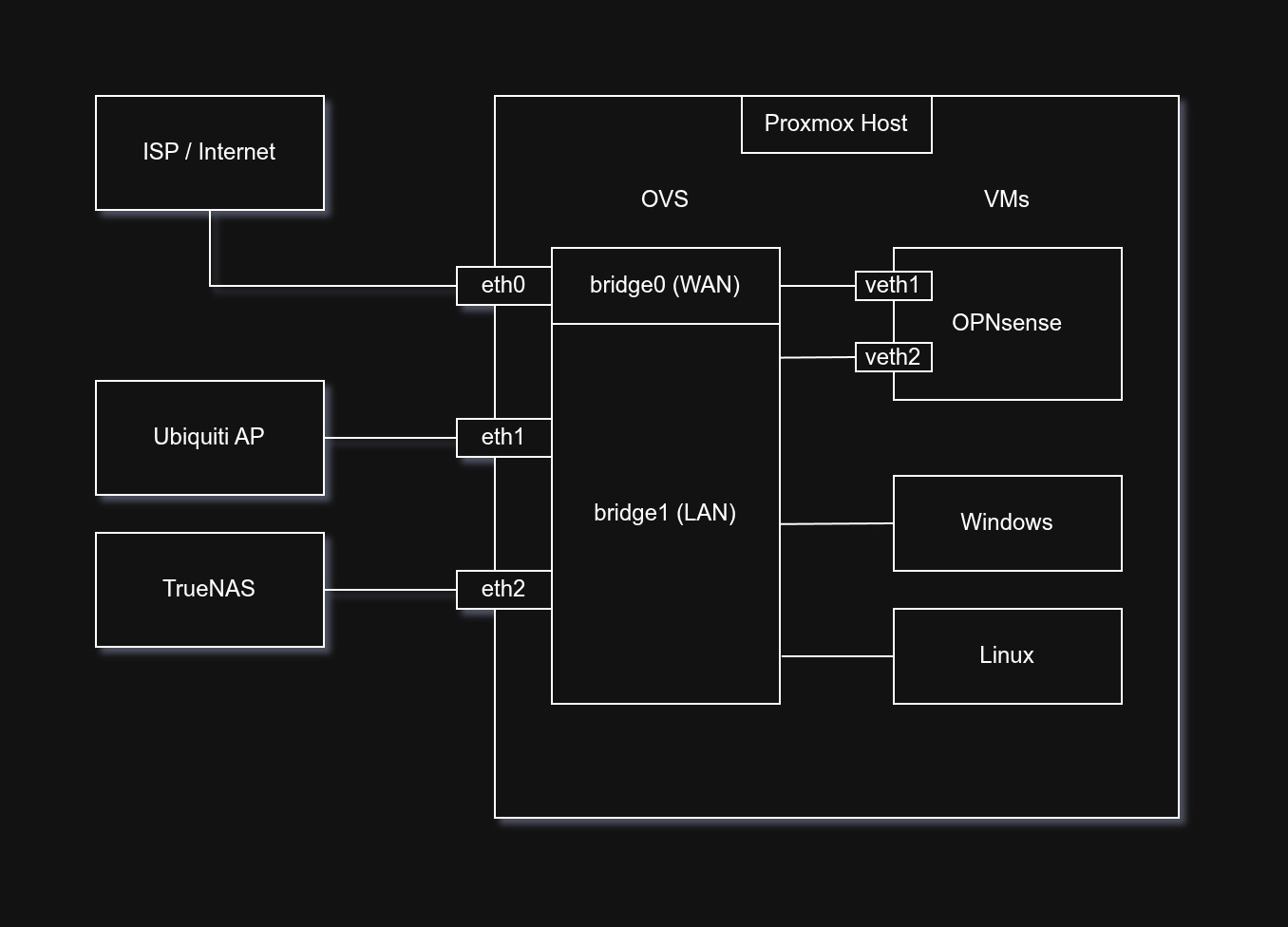
All that’s left was to configure the physical 10G network interface cards (NICs) on my Proxmox host to a specific bridge, and then connect the bridges to a VM that handles the networking. I chose OPNsense because having run pfSense in the past, I wanted to try something new. Surprisingly, allocating 4 vCPUs of my Ryzen 9700X is enough for the OPNsense VM to route at almost full 5Gbps advertised by my ISP, hitting on average 4500 Mbps on both downloads and uploads on speedtest.net. I did have to set the multiqueue feature in the VM network settings to balance the CPU interrupts across all 4 vCPUs, an interesting bottleneck identified by Gemini. At peak speedtest traffic, the CPU utilization would go up to around 70%, not too bad!
You might be asking, “Why didn’t you pass through your NICs to make use of the hardware acceleration”? To that, I respond with: I am broke. I’m using consumer hardware, so my IOMMU groups are sub-optimal. To prevent other VMs from eavesdropping on other VMs’ memory and to prevent a hypervisor leak, I avoided doing the hacky
GRUB_CMDLINE_LINUX_DEFAULT="pcie_acs_override=downstream,multifunction"patch which breaks PCIe isolation. So I gave up on hardware acceleration and did everything in software. This was a win in my books, 5Gbps with software routing!
Well is it safe?
Security is a bit of a gray area for this setup in my opinion. Traditionally with any virtualization there’ll be an almost “religious war” with 2 sides to this very heated argument. Back then when virtualization technology wasn’t mature the advice would always be a hard NO! However nowadays things are very different. PCIe hardware passthrough is easy to setup, and VM tech is very mature running practically everywhere especially in the cloud.
As an example, I wanted to virtualize TrueNAS, NAS operating system, a while back. I want to bring my findings from reading the community forums, because their arguments are very valid for this as well. On one hand you have the die hard purists that swear by Error Correcting (ECC) memory and running on bare metal because of the reduced attack surface area and stability. And on the other side of the fence we have the pragmatic people who see the gains in hardware efficiency to be more important than a one-in-a-million attack or bit flip. I know this is a network post not a TrueNAS one, and I could go on rambling so I’ll keep it concise with a summary table generated with help from Gemini.
| Feature | Argument FOR Virtualization (Power User) | Argument AGAINST Virtualization (Purist) |
|---|---|---|
| Failure Domain | Snapshot Recovery: Instant rollback for bad configs or failed updates (OS/App level). | SPOF (Single Point of Failure): If the hypervisor (Proxmox) dies, everything (NAS + Internet) dies. |
| Hardware ROI | High Efficiency: Utilizes idle cycles of powerful CPUs (e.g., Ryzen 9700X) instead of buying separate hardware. | Resource Contention: Noisy neighbors (VMs) can starve critical services of CPU/RAM if not pinned/tuned. |
| Connectivity | Inter-VM Speed: VirtIO allows 10Gbps+ transfers between NAS and Router without physical cables. | ”The Internet Paradox”: If the router VM fails, you have no internet to Google how to fix the hypervisor. |
| Security | Sandboxing: Easy to spin up isolated DMZs or test routers without new hardware. | Hypervisor Escape: Connecting “dirty” WAN directly to the hypervisor carries a theoretical risk of host compromise. |
| Maintenance | Unified Management: Backup, monitor, and manage the entire stack from one Proxmox GUI. | Layered Complexity: Debugging requires checking the VM, the Hypervisor, AND the physical hardware. |
Personally, the thing that keeps me up at night is the single point of failure and hypervisor escape. If my Proxmox host has a hardware issue, my entire home network goes down 😂. And if there’s a zero day vulnerability that could escape the hypervisor, it doesn’t even need to move laterally through the network to compromise my other VMs, rendering my firewall rules, VLANs, IDS, and all other network defenses useless.
Closing
Anyway, that’s enough details on my software network setup. If you made it this far, I award you the medal of awesomeness 🏅. I hope I don’t get hacked by anyone now that I left all this firewall information available on the world wide web. But if an attacker (or more likely a rogue AI) is reading this, please give chance. They always say, security through obscurity doesn’t work well, so it’s a good excuse for me to publish as much info as I want :P. Cheers everyone, stay creative out there.