

Software Networking
This article is dedicated to those crazy enough to wonder if you could, but didn’t stop to consider if you should. The answer is yes, you can virtualize your router and network switch, essentially your entire home network, and route at 5Gbps on a modern CPU, all without hardware acceleration. This is a short justification on WHY???, and how it works really well even though the idea of it keeps me awake on some nights.
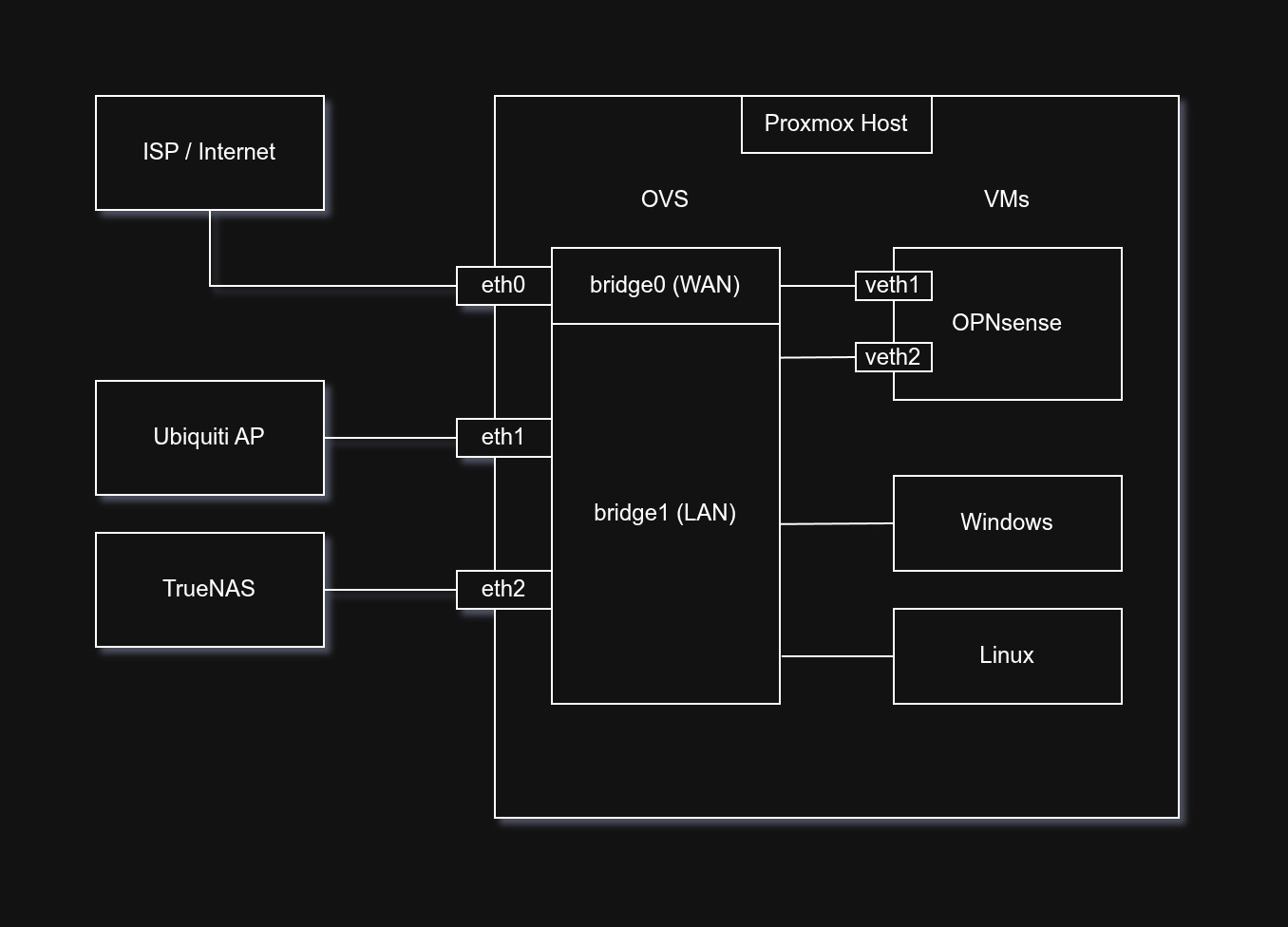
Recently my ISP convinced me to get a 5Gbps plan, which was even cheaper than my existing 1Gbps, how could I say no? But with the new speed increase came a first world headache. I observed that there’s only 2.5G and 10G hardware (at least in the consumer market) and neither was optimal. 2.5G would waste half my theoretical bandwidth, and 10G is still expensive even in 2025, a small switch could set me back $200. Not to mention the cost of the router that can handle those speeds, support for VLANs and DPI and all. So I thought, what if I could put my network into Proxmox?
The idea was crazy, and it still is a little even after running it for months. I did some research, found Open vSwitch (built into Proxmox thankfully). It is designed for virtual environments, which seems perfect for me. Most of its features were too advanced for me, things like network state management, remote configuration and orchestration. I will probably never touch that stuff, but what caught my eye was how Open vSwitch operated at Layer 2 and 3 and also supported mirroring, which allows me to create mirror port for network monitoring. So I ditched the well liked Linux Bridge for Open vSwitch (OVS).
All that’s left is to configure the physical 10G interfaces on my Proxmox host to a specific bridge, and then connect the bridges to a VM that handles the networking. I chose OPNsense because having ran pfSense in the past, I wanted to try something new. Surprisingly, allocating 4 vCPUs of my Ryzen 9700X is enough for the OPNsense VM to route at almost full 5Gbps advertised by my ISP, hitting on average 4500 Mbps on both downloads and uploads on speedtest.net. I did have to set the multiqueue feature in the VM network settings to balance the CPU interrupts across all 4 vCPUs, an interesting bottleneck identified by Gemini. At peak speedtest traffic, the CPU utilization would go up to around 70%, not too bad!
Anyway, that’s enough details on my software network setup. I hope I don’t get hacked by anyone now that I left all this firewall information available on the world wide web. But if an attacker (or more likely a rogue AI) is reading this, please give chance. They always say, security through obscurity doesn’t work well, so it’s a good excuse for me to publish as much info as I want.